The Future of Industrial Networking

December 13th, 2011 Posted by: Jonathan Witthoeft -->

What is an industrial network driven on?   What will prepare a network for the future?  Microprocessors are the “Heart of the Network,” according to Jim Montague, executive editor at Putman Media.  “Heart of the Network,” featuring our own Mike Justice, is the featured publication in the fourth quarter 2011 edition of Industrial Networking.

Mike Justice stated, “Microprocessors might be on the lowest layer of the network, but they have a huge influence.”  Chips have evolved from simple standard microprocessors, to application-specific integrated circuits, field-programmable gate arrays, and so on.  Design flexibility is what allows industrial networking to move into the future.

gridARM System on a Chip

Gigabit Ethernet will help industrial networks keep up with the bandwidth requirements for increased network traffic.  Many gigabit products have already hit the commercial network.  It will not be long before the industrial Ethernet networks will need to speed up.  With our new gridARM microprocessor, we are able to supply our customers with a cheap Gigabit Ethernet solution for adding fast Ethernet to their devices.

The gridARM microprocessor is designed for low cost products that require a fast Ethernet connection.  This system on a chip is most flexible because it includes an ARM7TDMI core, 10/100/1000 Ethernet MAC, CAN controller, up to 3 serial ports, I2C, SPI, on chip SRAM, USB device, A/D converters, and interfaces for SDRAM, Flash, Compact Flash, external SRAM, and NAND flash.

To understand why the microprocessor is the underlying technology driving advances in industrial networks and to understand how you can benefit from the evolution of microprocessors, download the full “Heart of the Network” article below.

Grid Connect is PROFINET!

November 14th, 2011 Posted by: Adam Justice -->


Above you will find the latest video from PROFIBUS International starring our own Mike Justice.

Grid Connect is committed to PROFINET and we provide an expanding selection of PROFINET products and services.  Our engineering staff have deep expertise and knowledge in all things PROFINET and are able to help deliver leading edge solutions.

Have a PROFINET challenge that is not solved by hardware out on the market today?  Contact us to discuss custom engineering and other PROFINET solutions.

You can find our full line of PROFINET products available at http://www.gridconnect.com/profinet.html

For more information on PROFINET check out All Things PROFINET and the PROFIblog

10 Factors when deciding between Industrial and Consumer Networking Devices

October 20th, 2011 Posted by: Jonathan Witthoeft -->


1.  Protection against solid foreign objects

What solid foreign objects are a part of your operational atmosphere?  Will your device need to be dust tight, protected against wires, or not protected at all?  If maintenance is not an option due to distance or inaccessibility, then you might need to consider what objects can find their way into your devices enclosure.

2.  Protection against water

This is very important in an outdoor application.  You want your device to be able to withstand rain.  Also what if you need your device to be submerged in water, or need to be able to hose down the device when cleaning an industrial area?  These are all conditions that need to be considered when determining which device to go with.

3.  Protection against oil, coolant, and corrosive agents

Hazardous materials can limit the range of products applicable for use.  Without a doubt, you need to have an industrial product for protection against oil, coolant, and other corrosive agents that might be in that operational atmosphere.

4.  Temperature range

There are typically two temperature ranges to consider in the specifications of a product: operational temperature and storage temperature.  Industrial products tend to have wider ranges for both of these.  If you need to store or use a device in an extreme temperature, you would want to use an industrial device.

5.  Durability

Some applications require a tolerance for impact or fast motion.  Some tests that are done on industrial devices include stationary vibration, shock, and vertical free-fall.  Some devices are also given an impact rating from 0 to 20.0 Joules.

6.  Surge protection

Surge protection ratings specify the protection level electrical devices have from voltage spikes.  In certain conditions components need to be able to withstand large spikes in voltage.  Industrial devices tend to have a higher range of tolerable AC and DC voltage spikes.

7.  Electromagnetic response

In many applications multiple electronics are in the same confined area.  Some of which might have motors, or other components that create EMF.  It is important, in this case, that your device can tolerate different electromagnetic conditions.  Industrial devices have higher electromagnetic resistance than consumer devices.

8.  Power supply

Consumer products are usually powered with a wall plug.  Industrial products are often powered in parallel to each other.  They share power supplies, rather than having a dedicated power supply for each unit.  Some have redundant power inputs that are used with redundant power supplies.

9.  Enclosure mounting

Many consumer devices are designed to be set on a desk or other flat surface and do not include any mounting options.  Industrial products include mounting options such as DIN Rail Mounting and Panel Mounting.

10.  Longevity

Most industrial products in an industrial application would be functional approximately 3 to 5 times longer than a consumer device in normal IT application.

Announcing the gridARM System on a Chip

September 22nd, 2011 Posted by: Adam Justice -->

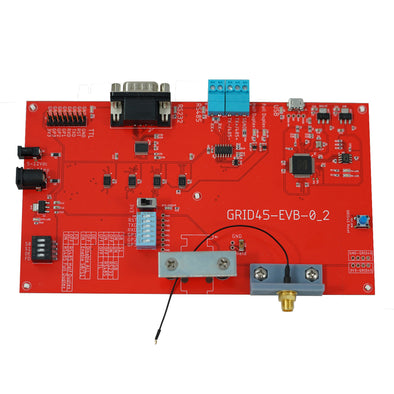
gridARM System on a ChipToday we are announcing the gridARMtm, System on a Chip, with integrated Gigabit Ethernet. The gridARM is targeted at the low cost embedded marketplace where cost and performance are important. The cost for quantity 100 pieces is $10 each.

The gridARM is designed for low cost products that require a fast Ethernet connection. As most IT networks, PCs and laptops are all gigabit Ethernet, it only makes sense to have all your devices on the network to be as fast as possible. The gridARM is designed to be the main processor in the system. The cost of adding Ethernet to your product is now low and can be a marketing and performance advantage for your product.

The gridARM is available in volume today. The development kit includes an evaluation board, cables, JTAG emulator, power supply and a complete set of development tools including a royalty free real-time operating system, TCP/IP v4/6 library, web server, telnet and example tunneling software.

The gridARM is available in two packages – 225 pin BGA and 208 pin QFP. The gridARM chip includes an ARM7TDMI core, 10/100/1000 Ethernet MAC, CAN controller, up to 3 serial ports, I2C, SPI, on chip SRAM, USB device, A/D converters, and interfaces for SDRAM, Flash, Compact Flash, external SRAM, and NAND flash.

The gridARM is our third ASIC in the family. The LX and EX ASICs have been around since the early 2000 and are used by thousands of customers in commercial and industrial applications. The gridARM is manufactured for Grid Connect by Atmel Corporation.

For more details or to purchase a development kit please go to: http://www.gridconnect.com/gridarm.html

Routers and Switches and Hubs…Oh My!

September 12th, 2011 Posted by: Jonathan Witthoeft -->
EKI-2728-BE Industrial Gigabit Switch

8 Port Industrial Gigabit Switch

Hubs, switches, and routers are all the same in the sense of connecting network devices with each other at one of three speeds.  Most devices are capable of both 10Mbs and 100Mbs and will automatically detect the speed.  If the device is only capable with one speed then it will only be able to communicate with switches that also support that speed.  Gigabit devices (1Gbs) are starting to slowly become more common as well.  Gigabit switches, e.g. our GC-EKI-2728-BE, can be used with these devices to utilize that faster speed.

Speed aside, there are still key differences between routers, switches, and hubs that many people are confused about.  I often see people misusing these titles and would like to clear this up.  I will start with the least complicated.

A Hub is the cheapest option of the three.  They are not intelligent and they simply forward all communication that is received on one port out to all of the remaining ports.  All of the devices connected to a hub can see all of the data sent through it.  The hub does nothing with the data being transmitted.  Hubs are great in small networks without a lot of traffic.

ATC 405 Industrial Managed Switch

5 Port Industrial Managed Switch

A Switch does a little more.  A switch is intelligent.  Switches recognize what devices are on what ports by analyzing that ports traffic.  It is able to determine which particular addresses are associated with which particular ports.  For example, if it sees traffic from my PC coming in on port 1, it will send all traffic for my PC to port 1 and not any of the other ports.  With switches, most of the network traffic only goes where it needs to rather than to every port.  On larger, busy networks this will increase the network speed.  Managed switches, like our GC-ATC-405, have their own IP address and have configurable options such as directing traffic to certain ports or ignoring traffic of a certain protocol.

A Router is the most intelligent of the three. A router is a Layer 3 gateway, which means it operates at the network layer of the OSI model.  It routes traffic from one network to another.  It has the same functionality as a switch and a hub, but also does much more.  A router is programmed to understand, possibly manipulate, and route the data it’s given.    Most routers include the ability to hide devices behind a firewall as well as all of the functionality found in a managed switch.  With the use of a routing table, routers have the ability to filter traffic, either incoming or outgoing, based on the IP addresses of senders and receivers.  The entire configuration is done through some kind of user interface, e.g., a web page.

IP in your hand…Really!!

November 8th, 2010 Posted by: Rick Rockershousen -->

The world’s tiniest device server, the NET232jr, was originally nicknamed by its first customer as “IP In Your Hand”.   This clever turn of phrase gave us a few chuckles, but it does point out the amazingly small size of the NET232jr.    The  NET232 “junior” enables serial devices with IP technology in the smallest package available in the world (as far as we know!).

We were able to shrink down the size of our standard NET232 by getting rid of the power regulation circuitry and the power LED.    This change requires that power be provided to the NET232jr over the serial port (coming from the serial device), and that power must be regulated at 3.3VDC or 5VDC.    This obviously means that the NET232jr is not for everyone.

The NET232jr has been primarily used thus far by OEM’s who want to offer it as an add-on for their serial port devices, and who have the ability to modify the serial port of their product to put out the power required.    You might ask “if you’re going to modify your product to put out power on the serial port, why not just go ahead and add the XPort (the main component inside the NET232jr) to your product instead?”    Well, there are several reasons why you might not want to do that.  First and foremost is cost.  Maybe you expect only a limited percentage of your customers to actually need an Ethernet connection.   Why put an XPort in every product?  Why not just sell an add-on that is small, smart, cost-effective and can be customized to your specifications with ease?   This is the motivation for the NET232jr.

Another interesting use of the “junior” is when you have a serial device that must be operational at all times, and you need to “live swap” it for servicing quickly and simply.   If you use the NET232jr as the network connection, then you can leave the NET232jr attached to the network while you swap out whatever serial device is attached.  This means you do not have to reconfigure the network connection for the new device; you simply plug it in and the NET232jr “remembers” the network settings.   Thus, you do not need to call in IT personnel to replace your serial device – anyone can do it – just plug it in!

The NET232jr came into existence when a customer asked for something smaller than the NET232 (which is already one of the smallest Serial to Ethernet device servers on the market).    Grid Connect is happy to discuss your project/product needs with you and see if we can find a solution – even if you don’t see on our website.  We have on staff a team of engineers dedicated to finding solutions to your networking problems.    Maybe you need a custom design that will fit in your enclosure or cabinet.  Who knows – maybe you’ll even see an “IP in your cabinet” blog post someday!

Ever wanted to be a Fly-On-The-Wall?

September 13th, 2010 Posted by: Rick Rockershousen -->

Small business owners, businesses with multiple retail locations/branches, and even individuals with an elderly parent living alone, can all benefit from our remote audio surveillance technology over IP!

Small business owners, who want to be able to listen in from home or other locations when trouble arises at their business, can do so using our IP Intercom/Paging Technology powered by Digital Acoustics.

Let’s say you have video surveillance of your retail franchise and want to hear when something happens. Or maybe you’d like to “yell” at troublemakers after hours that are on your car lot. Using the IP7-SE8, you can wire in a wide variety of speakers (including paging horns, ceiling speakers and wall speakers), and microphones, including very sensitive omni-directional mics, and be able to monitor and talk to your business location from any remote location with Internet access from your PC.

Using the Talkmaster Software on your PC (free with purchase of the IP7-SE8), you can communicate over the network with your business. Listen to disturbances, or simply talk to your employees and/or customers from anywhere in the world.

For multi-location businesses, you can make announcements to your employees at all locations at the same time. You can even play music and other recorded programs from your PC using the Network Music software. For locations where security is a concern, you can have a panic or help button installed by the cashier’s location, which would trigger the TalkMaster Software as an incoming call. You can then listen in and find out if any additional action needs to be taken.

For those with an elderly parent living alone, you can use a desk or surface mount intercom, which can be used to communicate in a time of need. This may be a life saving capability, allowing you to communicate with a relative who has taken a fall or is otherwise not able to answer the phone.

These flexible intercom and paging products provide extended security, surveillance, and paging applications anywhere there is an Internet connection. It’s an affordable, flexible and easy way to become a “fly-on-the-wall.”

*Note: Use of remote audio surveillance technology is subject to local, state, and federal surveillance laws.

Add One More Serial Adapter and the Universe Might Collapse

August 17th, 2010 Posted by: Adam Justice -->

A reader over at Gizmodo sent in this picture of a ludicrous chain of serial adapters.

In this chain we have:

  • A Parallel Port DB25 Gender Changer
  • Parallel DB25 to Serial DB9
  • Serial DB9 to Serial Min DIN 8
  • Min Din 8 to USB

The crazier part is that the reader sent in this screen shot and claims that this chain of adapters is fully operational.

It is certainly possible that this screenshot could have been doctored.  We didn’t believe this would work ourselves so we managed to gather up all the right adapters and form our own Serial Adapter Chain.  This one is Busted!  There are a few reasons we believe this would not work, first of all the Parallel Port only puts out 2.5 volts where most USB devices require 5 volts to run.  Also there would have to be some sort of driver used to recognize a USB device on this port.  It appears the person who submitted the picture may have used a strange driver to get it to show up but there is no way they are talking to the USB Flash drive on the end of that chain.

Here is a Picture of Glenn one of our Engineers testing if Power will actually go from a pin on the Parallel adapter all the way through to the USB (it does)

Note: We at Grid Connect do not endorse such an insane chain of serial adapters and typically recommend only using one at a time

Via Gizmodo

Surprising PROFINET Market Share Numbers!

August 11th, 2010 Posted by: Mike Justice -->

PROFINET-Market-Share

Just last week I attended the PROFIBUS Trade Organization’s (PTO) annual meeting.  It was two days of great presentations and networking with other members.

The first major announcement was that the PTO is changing its name to PROFIBUS & PROFINET International North America (PI).  They also announced a new website for PROFINET information and application examples.  You can visit the new site today at allthingsprofinet.com.

As you can see in the pie chart above PROFINET is making some impressive gains in market share amongst the other Industrial Ethernet based protocols.

Another big announcement made at the annual meeting was that GE’s Intelligent Platforms Division and several other semiconductor companies have committed to using PROFINET going forward.

While many companies who are in full production are using PROFIBUS today, those who are working on new designs are looking closely at PROFINET for future Ethernet implementations.  PROFINET seems to have addressed the levels of performance needed and the real-time issues found in basic Ethernet, Real-time Ethernet, and Isochronous Real Time Ethernet.  The first two types of PROFINET (Basic and Real-Time Ethernet) can be implemented using standard Ethernet controllers.  The isochronous version of PROFINET requires special Ethernet MAC controllers that can guarantee packet delivery.  We believe that most applications out there can be accomplished using standard Ethernet controllers.

PROFIBUS Guides Available, One-Day Training Classes Coming to a City Near You!

August 2nd, 2010 Posted by: Adam Justice -->

If you are a company who uses PROFIBUS networks in your automation environment, the PROFIBUS Trade Organization (PTO) was set up to help people like you.  The PTO can provide you with a wealth of information on planning, setting up and installing your PROFIBUS network.

Now available from the PTO are a full set of Guides for Planning, Installing Cabling and Assembly and Commissioning your PROFIBUS network.

Visit the PTO Website, to download all of their installation Guides.

In addition to these great guides, the PTO also puts on one-day training classes throughout the USA and Canada.  We at Grid Connect are PTO members and sponsors of these classes.  We generally attend most of the classes and talk with customers about our great selection of PROFIBUS and PROFINET products including PROFIBUS Troubleshooting Kits, PROFIBUS Hubs, and More.

Below is the class schedule for the remainder of the year:

August 17, 2010            PROFIBUS One-day Training Class Tulsa, OK

August 26, 2010            PROFINET One-day Training Class Cleveland, OH

September 2, 2010        PROFINET One-day Training Class Denver, CO

September 14, 2010      PROFINET One-day Training Class Toronto, ON Canada

September 16, 2010      PROFINET One-day Training Class Montreal, QC Canada

September 22, 2010      PROFIBUS One-day Training Class Baltimore, MD

October 6, 2010             PROFIBUS One-day Training Class Omaha, NE

October 21, 2010           PROFINET One-day Training Class Dallas, TX

November 9, 2010         PROFINET One-day Training Class Detroit, MI

Via The PROFIblog